• Video
  • Shop
  • Culture
  • Family
  • Wellness
  • Food
  • Living
  • Style
  • Travel
  • News
  • Book Club
  • Newsletter
  • Privacy Policy
  • Your US State Privacy Rights
  • Children's Online Privacy Policy
  • Interest-Based Ads
  • Terms of Use
  • Do Not Sell My Info
  • Contact Us
  • © 2026 ABC News
  • News

How to Wipe Your Old iPhone Before You Give It Away
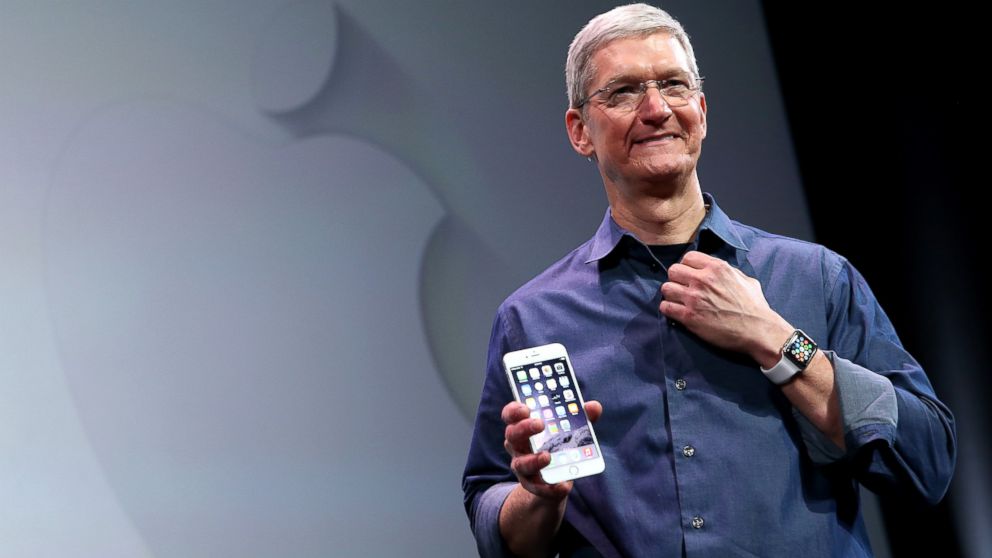
Apple CEO Tim Cook shows off the new iPhone 6 and the Apple Watch during an Apple special event at the Flint Center for the Performing Arts, Sept. 9, 2014, in Cupertino, Calif.
Justin Sullivan/Getty Images
ByALYSSA NEWCOMB
September 18, 2014, 3:58 PM

— -- The announcement of the iPhone 6 and iPhone 6 Plus might have made you eager to part with your old iPhone -- but there's one important step you need to take before making the switch.

If you're planning on giving away, selling or trading in your current iPhone, it's recommended that you make sure your device is wiped clean. This will make sure your personal information and digital memories aren't given to someone else.

3 Key Differences Between the iPhone 6 and the iPhone 6 Plus

Apple's iOS 8 Is Here: What to Do About That Pesky Storage Problem

Head to Head: How Apple's New iPhone, Watch Compare to Samsung's Products

First, it's important to make sure your phone is backed up. There are two easy ways to do this.

iCloud

Chances are you're already using the iCloud, but here's how to make sure you've recently backed up everything.

Tap Settings, then go to iCloud, choose Storage & Backup.

Make sure the iCloud switch is toggled to "on" and then choose "Back Up Now."

iTunes

Connect your iOS device to your computer and open iTunes. Then, choose file, devices and then backup.

If you're using a version of iTunes 10.7 or earlier, right click the device from the list and then choose "backup now."

Double check that the backup worked by going to preferences and then clicking devices. The latest backup and the device should be listed on the screen.

Wiping the Phone

Once you're satisfied everything is backed up to the iCloud or iTunes, you're ready to restore the phone back to its factory settings. Go to settings, general, reset and then choose "Erase All Content and Settings."

Now you're ready to sell, trade-in or give away your iPhone.

Up Next in News—

This San Francisco shop is run completely by an AI agent

April 23, 2026

Mother charged after teen son allegedly hits and injures 81-year-old veteran while riding e-motorcycle

April 23, 2026

UK bill banning smoking products for those born after 2008 is one step away from becoming law

April 22, 2026

Pilot killed in Florida plane crash hailed as hero

April 21, 2026

Shop GMA Favorites

ABC will receive a commission for purchases made through these links.

Sponsored Content by Taboola

The latest lifestyle and entertainment news and inspiration for how to live your best life - all from Good Morning America.
  • Contests
  • Terms of Use
  • Privacy Policy
  • Do Not Sell My Info
  • Children’s Online Privacy Policy
  • Advertise with us
  • Your US State Privacy Rights
  • Interest-Based Ads
  • About Nielsen Measurement
  • Press
  • Feedback
  • Shop FAQs
  • ABC News
  • ABC
  • All Videos
  • All Topics
  • Sitemap

© 2026 ABC News
  • Privacy Policy— 
  • Your US State Privacy Rights— 
  • Children's Online Privacy Policy— 
  • Interest-Based Ads— 
  • Terms of Use— 
  • Do Not Sell My Info— 
  • Contact Us— 

© 2026 ABC News