How to Opt Out of Google Policy That Displays Your Photo Beside Ads
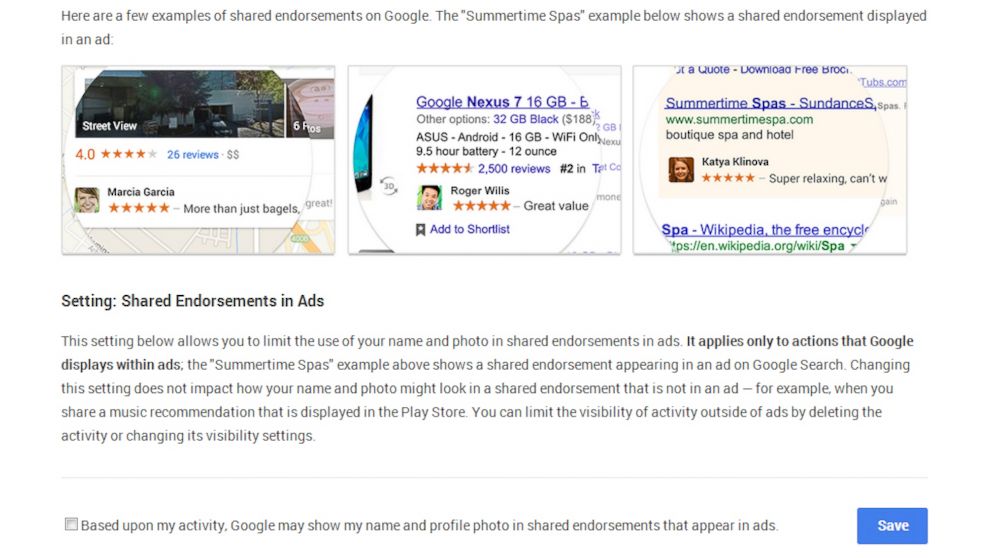
Oct. 14, 2013— -- The day after Facebook announced that it was removing a privacy option that would make all of its users searchable, Google made its own announcement for adding an option called "Shared Endorsements."
The new option would display Google users' names and profile pictures beside advertisements for businesses and products that they've endorsed with a review, a +1, or even a follow. Google account holders were concerned about how these changes could be exploited, but Google is giving its users the option to opt out early.
Unlike Facebook, which exists only as a social network, though one with over a billion users, Google+ is tied to many other online services. "Your Google username and password let you access lots of useful things," Google said in its official announcement, Such as "your Gmail messages, Google+ photos, YouTube videos, Google Contacts list and more."
That interconnectivity is convenient for quick access, but also raises some concerns since each service can have its own account settings. However, Google has made it easier for its users to maintain privacy than Facebook's recent policy change by explicitly giving its users a way to opt out.
To do so, users can visit the appropriate webpage through Google's announcement and follow it to the appropriate settings. For those who want to share the news with friends or family but don't want to deal with sending long links to follow, the option can also be accessed from a Google user's account settings. Clicking on the "Google+ tab" on the left sidebar will bring up the Shared Endorsements option.
Opting out of Shared Endorsements will keep users from having their identity publicized in advertisements, but it may not extend far beyond that. "This setting only applies to use in ads, and doesn't change whether your Profile name or photo may be used in other places such as Google Play," said Google. Google did not respond to ABC News' request for comment.
However, some Google users are making their own statement and turning Google's new ad policies on its head. Instead of opting out, they are replacing their own profile photo with one of Eric Schmidt, Google's executive chairman. The thought behind the profile swap is that if enough Schmidt photos are seen beside the advertisements, Google will be made aware that enough people care about the privacy concerns behind Shared Endorsements to remove it all together.
Then again, it wouldn't be surprising if Google put its facial detection software to use and just filtered out any advertisement with Schmidt's photo.