• Video
  • Shop
  • Culture
  • Family
  • Wellness
  • Food
  • Living
  • Style
  • Travel
  • News
  • Book Club
  • Newsletter
  • Privacy Policy
  • Your US State Privacy Rights
  • Children's Online Privacy Policy
  • Interest-Based Ads
  • Terms of Use
  • Do Not Sell My Info
  • Contact Us
  • © 2026 ABC News
  • News

How to see and manage what apps can access your private data on Facebook


4:24
Facebook stock drops amid data fallout
Andrew Harrer/Bloomberg via Getty Images
Anthony Morrison
ByTony Morrison
March 21, 2018, 7:17 PM

You may be surprised to learn that you're likely playing a prodigious role in how much information you’re openly giving Facebook access to, and in turn, their third-party partners -- like apps.

Of all the apps you’re using right now on your smart devices and even desktop computers, you’ve possibly given most of them access to your Facebook profile as well as personal data, including contact information. Restricting your Facebook information from apps, even ones you’ve used only once before is one of the first and most reliable of steps you can take in safeguarding your information across the internet.

How to manage app settings on Facebook:

First, on the top right corner of your profile, click on the downward pointing arrow and then click on “Settings.”
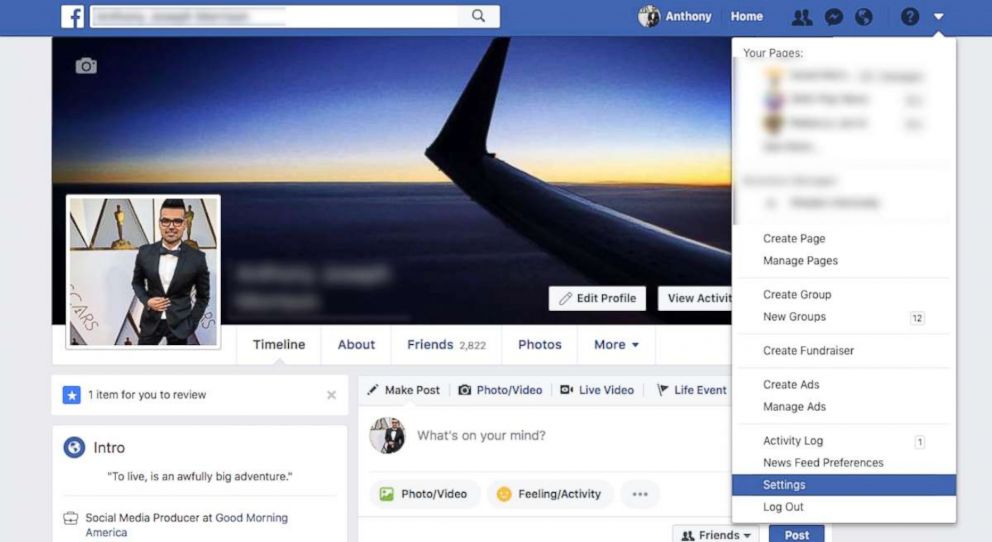
Here's a step by step guide for how to manage app access on Facebook.

On the far left, click on “Apps.” After you click on the App Settings panel, you will see all the apps that over time you’ve used to log into Facebook with, effectively giving those apps permission to access your Facebook data.
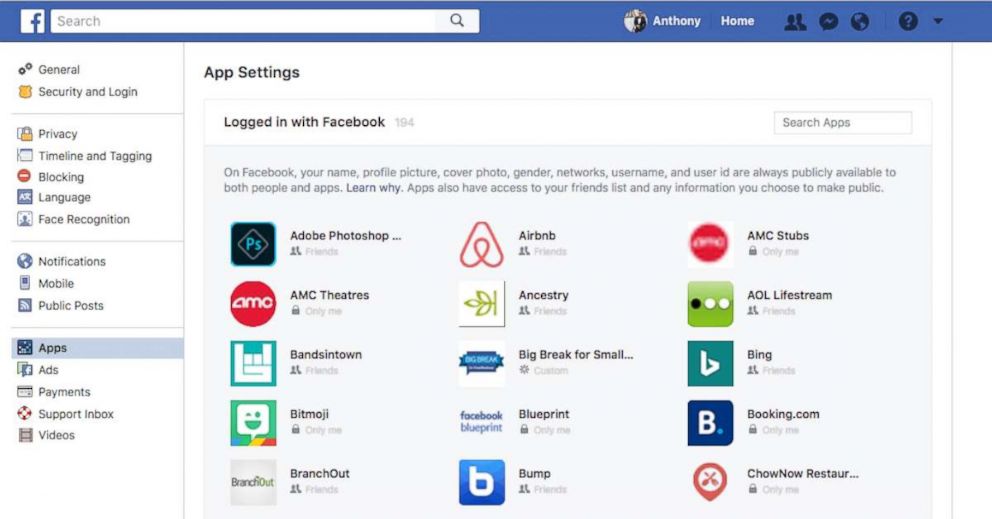
A step by step guide for how to manage app access on Facebook.

Facebook notes that Apps have access to your Friends lists and any information you choose to make public. When you click on any app you will be prompted with what specific information you are allowing that app to access. You can also choose to remove an app completely from having permission to you and your Facebook profile, even if your profile is private from public searches.
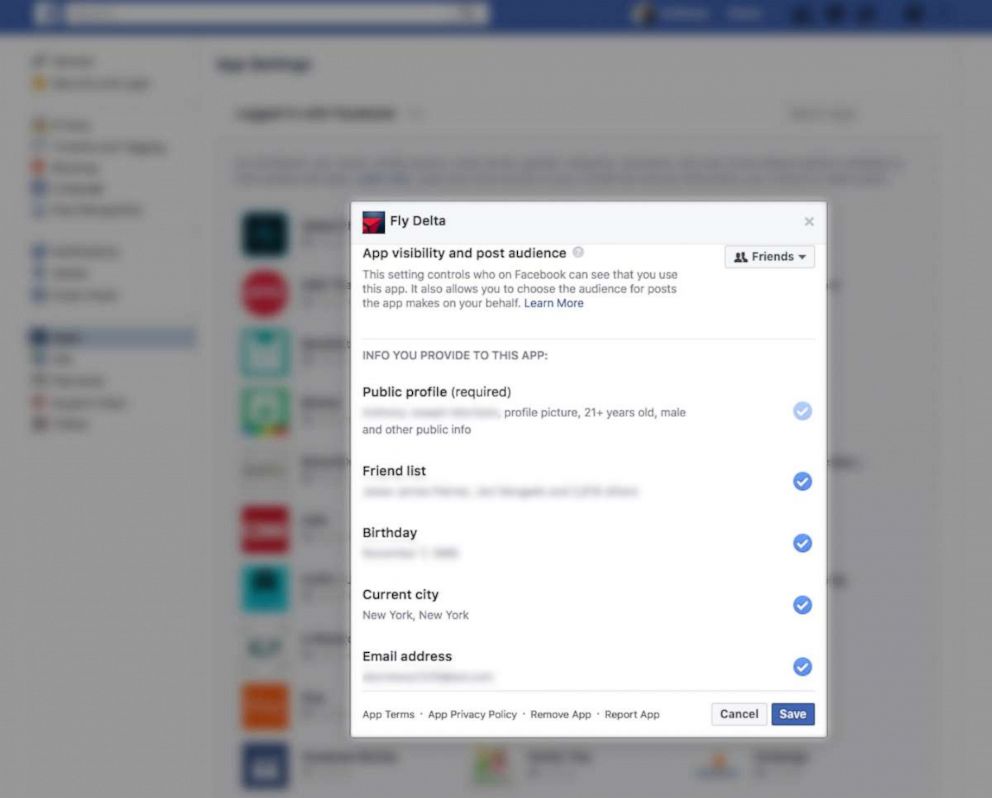
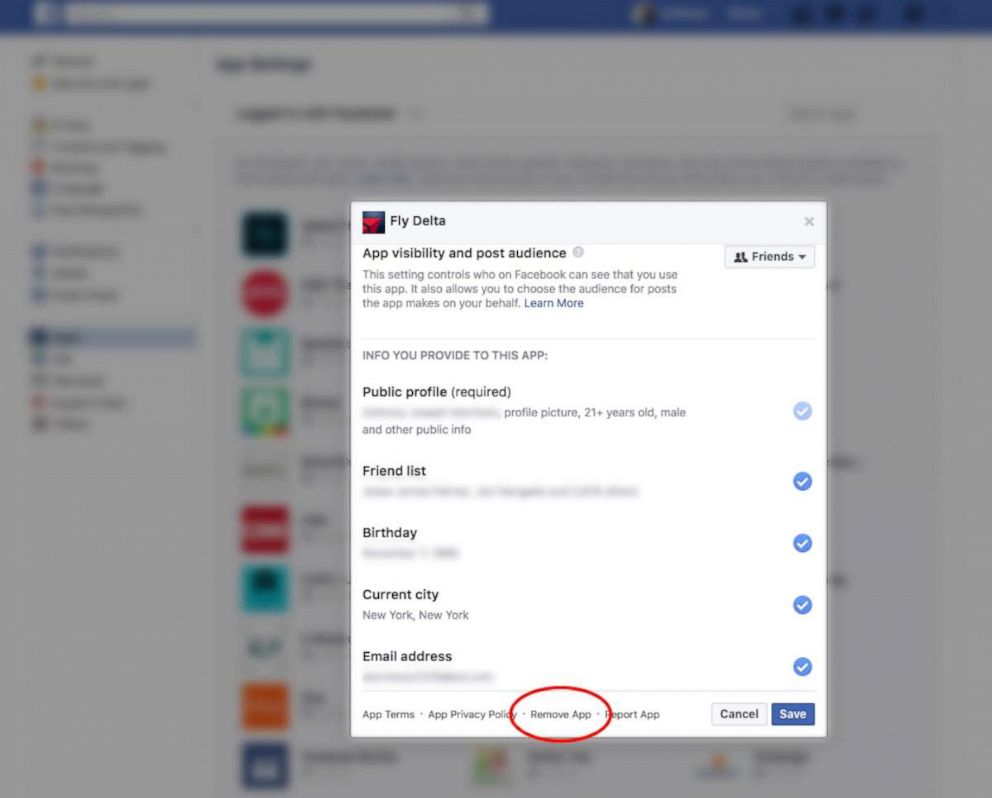
Here's how to manage app access on Facebook.
Here's how to remove app access on Facebook.

Even if you are not the most frequent Facebook user, it’s easy to give an app permission to your profile and then completely forget about it. It’s important to know that curating what apps have access to you is not a one-time task – you should make sure to check back on a regular basis to make sure your Facebook data and personal information are being shared appropriately and on your own terms.

Related Topics

  • Meta

Up Next in News—

Black educators say they're committed to the profession amid growing pressures, underrepresentation

May 8, 2026

Man arrested near former Prince Andrew's home

May 7, 2026

Jake Reiner discusses death of parents Rob and Michelle Reiner in return to podcast

May 7, 2026

How to save on gas with new Fuel Day promo at Circle K amid soaring prices

May 7, 2026

Shop GMA Favorites

ABC will receive a commission for purchases made through these links.

Sponsored Content by Taboola

The latest lifestyle and entertainment news and inspiration for how to live your best life - all from Good Morning America.
  • Contests
  • Terms of Use
  • Privacy Policy
  • Do Not Sell My Info
  • Children’s Online Privacy Policy
  • Advertise with us
  • Your US State Privacy Rights
  • Interest-Based Ads
  • About Nielsen Measurement
  • Press
  • Feedback
  • Shop FAQs
  • ABC News
  • ABC
  • All Videos
  • All Topics
  • Sitemap

© 2026 ABC News
  • Privacy Policy— 
  • Your US State Privacy Rights— 
  • Children's Online Privacy Policy— 
  • Interest-Based Ads— 
  • Terms of Use— 
  • Do Not Sell My Info— 
  • Contact Us— 

© 2026 ABC News